
Pour faire cette effet :
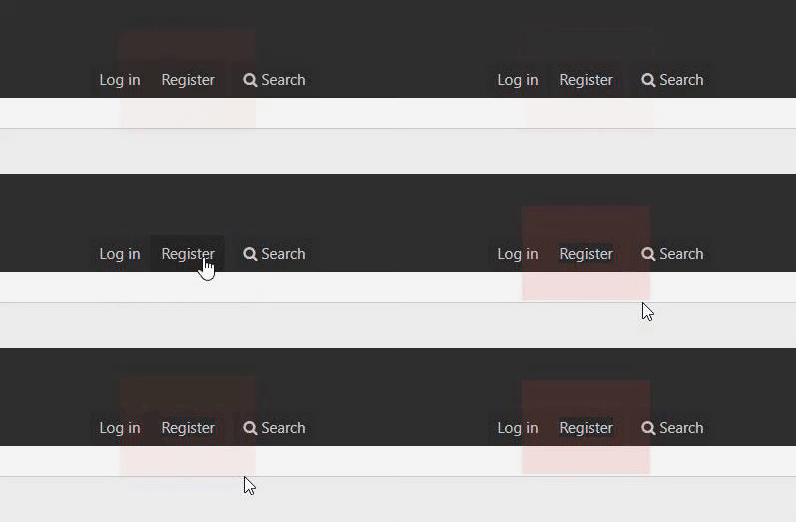
Ajoutez dans votre "extra.less" ce code :
[HIDETHANKS]
[/HIDETHANKS]
Enregistrez, et cherchez ce code dans votre "PAGE_CONTAINER" :
[HIDE]
Remplacez le par ce code ci-dessous :
[/HIDE]
Enregistrez et admirez ;)
CSS Effect Source : https://codepen.io/wifeo/pen/KwdXwV
Ajoutez dans votre "extra.less" ce code :
[HIDETHANKS]
CSS:
/* PULSE ANIMATION */
.pulse {
    position: relative;
  box-shadow: 0 0 0 0 rgba(232, 76, 61, 0.7);
  cursor: pointer;
  -webkit-animation: pulse 1.25s infinite cubic-bezier(0.66, 0, 0, 1);
  -moz-animation: pulse 1.25s infinite cubic-bezier(0.66, 0, 0, 1);
  -ms-animation: pulse 1.25s infinite cubic-bezier(0.66, 0, 0, 1);
  animation: pulse 1.25s infinite cubic-bezier(0.66, 0, 0, 1);
}
.pulse:hover {
  -webkit-animation: none;-moz-animation: none;-ms-animation: none;animation: none;
}

@-webkit-keyframes pulse {to {box-shadow: 0 0 0 45px rgba(232, 76, 61, 0);}}
@-moz-keyframes pulse {to {box-shadow: 0 0 0 45px rgba(232, 76, 61, 0);}}
@-ms-keyframes pulse {to {box-shadow: 0 0 0 45px rgba(232, 76, 61, 0);}}
@keyframes pulse {to {box-shadow: 0 0 0 45px rgba(232, 76, 61, 0);}}Enregistrez, et cherchez ce code dans votre "PAGE_CONTAINER" :
[HIDE]
CSS:
<span class="p-navgroup-linkText">{{ phrase('register') }}</span>
CSS:
<span class="p-navgroup-linkText"><span class="pulse">{{ phrase('register') }}</span></span>Enregistrez et admirez ;)
CSS Effect Source : https://codepen.io/wifeo/pen/KwdXwV