
Salut à toi membre de Insomni'Hack !
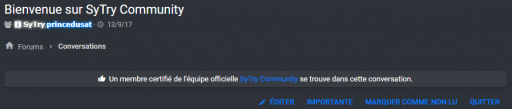
Aujourd'hui je vous partages un tutoriel sous xenForo 2.0 : celui-ci permet d'ajouter une annonce dans vos conversations !
Pour commencer dans votre template conversation_view chercher ceci (CTRL + F) :
Aujourd'hui je vous partages un tutoriel sous xenForo 2.0 : celui-ci permet d'ajouter une annonce dans vos conversations !
Pour commencer dans votre template conversation_view chercher ceci (CTRL + F) :
HTML:
<xf:breadcrumb href="{{ link('conversations') }}">{{ phrase('conversations') }}</xf:breadcrumb>Ajouter ceci juste en dessous :
Code:
<xf:foreach loop="$recipients" value="$recipient">
   <xf:if is="{$recipient.User.is_staff}">
      <xf:set var="$hasStaff" value="1" />
   </xf:if>
</xf:foreach>
<xf:if is="{$hasStaff}">
   <p style="text-align: center;" class="annonce"><i class="fa fa-thumbs-up "></i> Un membre certifié de l'équipe officielle <a href="https://sytrycommunity.fr/">SyTry Community</a> se trouve dans cette conversation.</p>
<xf:else />
   <p style="text-align: center;" class="annonce"><i class="fa fa-flag"></i> Aucun membre de l'équipe officielle <a href="https://sytrycommunity.fr/">SyTry Community</a> ne se trouve dans cette conversation.</p>
</xf:if>Dans votre template EXTRA.less ajouter ceci :
background: #383c42!important;
border-radius: 2px!important;
padding: 5px;
text-align: center!important;
box-shadow: 0 0 2px 0 rgba(0,0,0,0.14), 0 2px 2px 0 rgba(0,0,0,0.12), 0 1px 3px 0 rgba(0,0,0,0.2);
}[/HIDE]
Le CSS est le même que ce tutoriel, si vous avez l'autre ne la copier pas deux fois :
- https://sytrycommunity.fr/threads/ajouter-une-annonce-sur-vos-sujets-dans-votre-thread_view-2-0.463/
Résultat avant :

Résultat après :
J'autorise le partage de ce tutoriel avec les crédits !
Résultat après :
J'autorise le partage de ce tutoriel avec les crédits !
SyTry,


